
Where list matching came from
In NodeBox 3 most nodes work on lists. A grid node outputs a list of points, and a node that receives a list runs once for every element in it. When a node receives several lists of different lengths, NodeBox lines them up for you. We call that list matching. We didn't invent it. I first saw it in Grasshopper, and we adapted it for NodeBox 3 in 2012.
The problem
In What happened to NodeBox 2 I described copy stamping, the NodeBox 2 way to make every copy of a shape different. It worked, but students in our workshops got stuck on it, and it was slow. We were looking for a model where the variation is visible in the network and the engine doesn't have to go back up the graph for every copy.
Lists first
We already knew from teaching that lists are the key idea. In 2012 I wrote Teaching lists to designers, about what we learned in years of NodeBox 1 workshops. Once students learned to store their data in a list (the points of a path, the words of a text, the images in a folder), they could express their own ideas in code. Before that, loops and conditions didn't mean much to them.
So the data in NodeBox 3 would be lists. We still had to decide what a node does when one port gets five values and another gets three.
Grasshopper
The first place I saw a good answer was Grasshopper, David Rutten's visual programming plug-in for the Rhino 3D modeller. Grasshopper is used by architects, and its components accept lists on every input. When the lists have different lengths, Grasshopper lets you choose how to match them: follow the longest list and wrap the shorter ones, stop when the shortest list runs out, or combine every item with every other item.
What I liked about it is that you never write a loop. You connect a list to a port and the component runs as often as it needs to. That was what we were missing in NodeBox 2.
How NodeBox does it
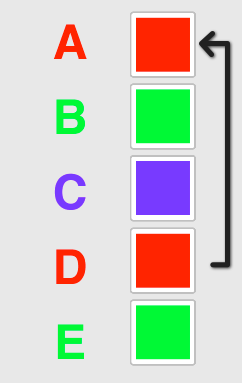
NodeBox 3 runs a node as many times as there are elements in the longest list. When a shorter list runs out, NodeBox starts again at its beginning. Here are five text paths and three colors:
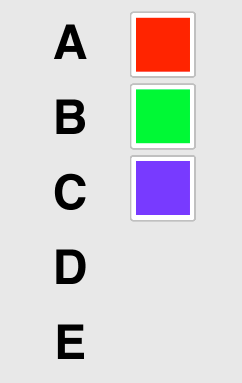
The colorize node runs five times. Red and green are used again for D and E:
Ten ellipses with ten sizes, then with nine sizes:


The test versions of NodeBox 3 matched on the shortest list instead, the way map works in Clojure. To repeat a value you connected an infinite list, a lazy sequence that never runs out. That broke down while people were editing. A network is often half connected, and when only infinite lists were connected to a node, NodeBox tried to process them forever. We added a limit to the number of objects in the viewer, but that was a workaround, so we switched to the longest list.
Longest list matching has its own trap. Say you cycle through 20 preset colors for a list of monthly sales. With fewer than 20 months, the colors become the longest list, and some sales are drawn more than once. That happened in our workshops, and the mistake is hard to spot in the output. In NodeBox Live we let you mark one list as the master list: the output never has more items than that list, and it never wraps.
Some nodes need the whole list at once: count, sort, shuffle and the other list nodes. Their ports take the list as a single value, so they run once and keep the list intact.
The rotated grid from the NodeBox 2 post shows the difference. In NodeBox 2 it took a place node, copy stamping and the expression stamp("CNUM", 45). In NodeBox 3 you connect a grid to a rectangle and a list of angles to the rotation, and list matching does the rest.
List matching was the main idea of the first NodeBox 3 alpha, which we named "NodeBox List Edition" when we released it in February 2012. It has been part of every NodeBox release since. The documentation explains it in more detail under How NodeBox Works. Chapter 4 of my PhD thesis, The Impact of Generative Design (2016), describes how list matching changed from NodeBox 2 to NodeBox Live.